Informed Repricer

Pulse

The latest product news, company updates, and insights from Informed Repricer.

Stop competing with your own selling accounts

Stop competing with your own selling accounts

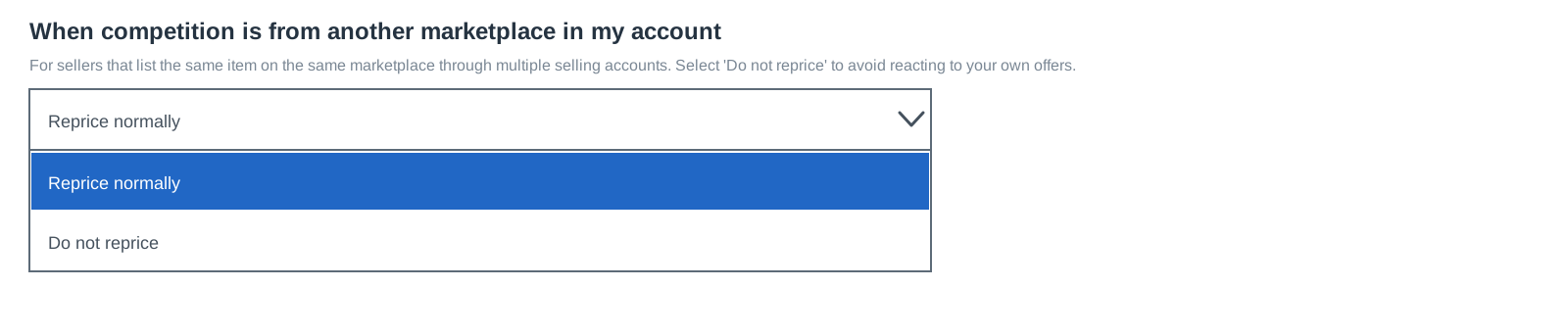
If you manage multiple selling accounts on the same Amazon or Walmart marketplace, your strategies can now avoid repricing against your own offers.

Use the new setting to control what happens when the competitor selected by your strategy belongs to one of your other connected selling accounts.

Here's what to know:

  • Reprice normally continues treating your other offers as competition.

  • Do not reprice stops the price change when the selected competitor is one of your other connected selling accounts.

  • The setting appears when you have multiple selling accounts connected for the same marketplace.

  • Existing and new strategies default to Reprice normally, so nothing changes unless you update the setting.

To make changes, go to the Strategies page, open the strategy you want to update, select Do not reprice, and save your changes.

Read more

Walmart Business marketplace support

Informed Repricer now supports Walmart Business, giving you a new way to compete for orders from businesses and organizations.

Walmart Business sellers can offer separate prices to business customers and additional discounts when they purchase larger quantities. Informed Repricer can now manage the single unit business price alongside your standard Walmart Marketplace pricing. Quantity discounts are configured in Walmart Seller Center and calculated from that price.

What’s new:

  • Reprice your Walmart Business offers automatically.

  • Manage consumer and business pricing separately.

  • Stay competitive without manually updating business prices.

  • Continue using quantity discounts based on your repriced business price.

Business customers often purchase more units at a time, but winning those orders still requires the right price. Walmart Business Repricing helps you stay competitive while keeping your single unit business price within the limits you set.

Walmart Business support is available now for all Walmart sellers with the addition of the Business Repricing add-on.

Read more
Introducing the Profit Calculator

Introducing the Profit Calculator

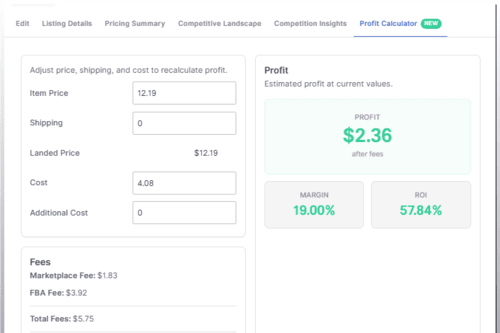
Open any Amazon listing, and you can now see exactly what you make on it. The new Profit Calculator is a tab inside the Listing Control Panel that shows your profit, margin, and ROI, and lets you change the price and cost to see how they move.

What you can do with it:

  • See your profit in three ways: fixed profit, profit margin, and ROI.

  • Update the cost or additional cost and save it straight to the listing.

  • Adjust the item price or shipping to change the landed price, then save that as a manual price. You'll need to confirm before it goes live.

  • Open the fee breakdown to see the referral fee rate and the other fees behind your profit.

  • Selling in more than one currency? The calculator shows the exchange rate it used, so your profit reflects the conversion.

Where to find it:

  • On your listings page, click a listing's profit to open the Profit Calculator tab.

  • On a listing without a cost, that column shows Set Cost instead. Click it to open the calculator with the cost field ready to edit.

  • You can also open any listing and select the Profit Calculator tab directly.

The Profit Calculator is available for Amazon listings.

Read more

Support for Amazon’s new additional FBA fee tiers

Informed Repricer now supports Amazon’s expanded FBA fee structure, including the new mid-priced product tier.

Amazon has historically applied different fulfillment fees to low-priced products and regularly priced products. For some items, Amazon has now introduced an additional tier between the two.

Informed Repricer automatically accounts for the correct fee tier when calculating minimum prices, profits, and evaluating potential price changes.

What’s new:

  • Full support for Amazon’s additional FBA fee tier.

  • More accurate fulfillment fee calculations across eligible products.

  • Automatic adjustments as an item moves between pricing tiers.

  • More reliable profit and margin calculations.

  • No manual configuration required.

For products near a fee threshold, even a small price change can affect the fulfillment fee charged by Amazon. Informed Repricer considers those changes before setting a new price, helping you avoid price changes that result in lower margins due to fees.

Support for the expanded FBA fee tiers is already active, no action is required.

Read more
Walmart is back. And better than ever.

Walmart is back. And better than ever.

A couple of years ago, Walmart removed access to critical pricing data. Now that data is back with more detail and real-time updates.

What changed?

• Direct API access to Walmart pricing data has been restored.

• Competitive pricing data is now delivered in real time.

• Faster reactions to market changes.

• More accurate pricing decisions.

While many repricers still rely on scraping, Informed Repricer receives real-time data directly from Walmart.

No scraping delays.

No incomplete data.

No guessing.

Real-time competitive intelligence directly from Walmart's marketplace APIs.

If you stopped repricing Walmart because the data wasn't there, it's worth taking another look.

The Walmart repricing advantage is back.

Read more

More control over your Strategy Automations

You can now set the priority for each of your Strategy Automations right inside the app. When a listing matches more than one saved view, the priority decides which automation is applied.

What's new:

  • Set a priority from 0 to 100 when you create or edit a Strategy Automation. When a listing matches more than one view, the one with the higher priority is applied, and ties go to the most recently saved view.

  • See and manage every Strategy Automation from one place on the new Automations page. This can be found on the left menu under Configure,** **then Automations.

  • Drag and drop your saved views to reorder their priority.

  • Delete a view you no longer need, and restore it later if you change your mind.

  • Edit any view using the same editor you already use on the Listings page.

  • Open a view's listings with one click straight from the Automations page.

If you're new to Strategy Automation, you can read more about it by checking out the Help Center article.

Read more
New Suppressed Buy Box Setting: Continue Repricing

New Suppressed Buy Box Setting: Continue Repricing

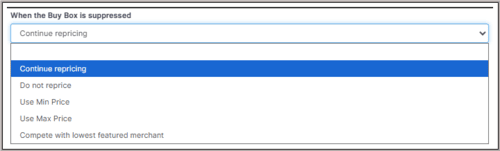
We just shipped improvements to how your strategies handle suppressed Buy Box situations, led by a new Continue repricing setting that keeps your listings moving when Amazon suppresses the Buy Box.

  • Continue repricing works to bring the Buy Box back. Suppression usually means prices have climbed too high, so Informed lowers your price in small amounts but never below your minimum.

  • Get the Buy Box protects more of your margin. On the Defend and Compete stances, your price now steps down gradually instead of jumping straight to Amazon's Competitive Price Threshold (CPT). Dominate works the way it always has and goes straight to the CPT, never above it.

Continue repricing is the new default. If you had the suppressed Buy Box setting disabled or never configured it, your strategies will now automatically use Continue repricing. If you already chose an option like Compete with lowest featured merchant, nothing changes for you.

To review the setting, create or edit a Get the Buy Box or Build Your Own strategy and find When the Buy Box is suppressed. Full details are in our Help Center article, When the Buy Box is suppressed.

Read more

Repricing Engine Performance Update

Amazon has been adding new features to its Selling Partner API (SP-API), and we’ve pushed the limits of every single one to make our repricing process faster.

  • A new feed format for better reliability.

  • Sending price updates to Amazon more frequently.

  • More compute power to process price change alerts in milliseconds.

Informed’s strategies were already the best in the world and now with even more speed you have a bigger advantage than ever.

There's no action required to enable the faster repricing, every account is already benefiting from the improved performance.

Read more

Automatic refresh of listing competition data

Competition push notifications are only sent for the first 20 offers on a listing and they are not sent at all for listings that are not currently live or are deactivated for any reason.

With this update competition data is now refreshed automatically using the APIs for listings that are not eligible for push notifications.

Read more

First party offer indicators and Amazon 1P seller names instead of merchant IDs

1P badges and Amazon seller names are now visible across all competition fields. When Amazon or Walmart is the seller, you'll now see a 1P badge anywhere we show competition as well as "Amazon" or the specific Amazon marketplace/service instead of internal merchant IDs. This includes Competition and Buy Box fields, tooltips, and the Competitive Landscape.

Read more

Smarter price increases while in the Buy Box

Informed Repricer is the only repricer that raises your price to capture more margin while you're alreadywinning the Buy Box. In the latest update to the repricing engine it just got even smarter, raising the price in more scenarios than ever and pricing as high as possible without losing the Buy Box.

Read more

Sticky column widths

Up until now, resizing a column on the listings page would only persist until the page was refreshed. WIth this update, resize a column in the listings table and the width will stay put in that browser until it is changed.

Read more
Listing Activity Timeline design refresh

Listing Activity Timeline design refresh

Here’s what’s new:

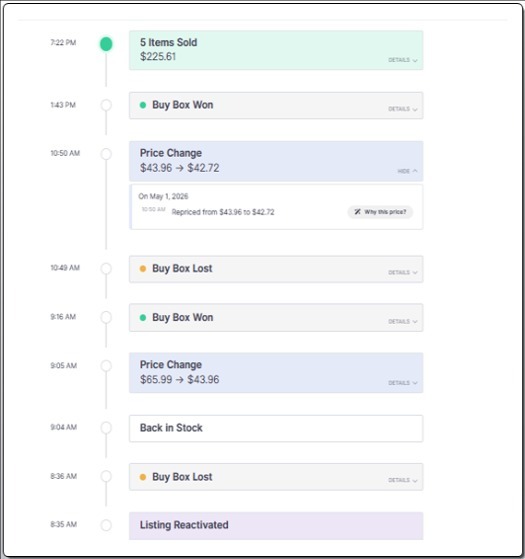
  • Price moves are visible without expanding. Each price change card now shows where the price started and where it ended on the closed card. No clicks required to read the timeline.

  • Bursts of price changes don't drown the view. When several updates fire in close succession they collapse into a single card with the full price range across the burst.

  • A new "Why this price?" button on every price change card. Click "Details" on any price change card to see exactly what drove the repricer's decision.

  • Two new badges flag the unusual. A yellow Retry badge marks repeated identical price changes. A red Overridden badge marks a price change that started from somewhere Informed Repricer didn't put it. This is an indicator that a price change occurred outside of our app.

  • Back-to-back sales group up. When orders land in a row on a listing with no other activity between them, they collapse into a single card with the combined revenue on the front. Fewer cards to scroll past on a strong-selling listing.

To check out these updates, click the Menu icon under the Actions column on the Listings Page, then select "Activity." You can also access it from the Orders or Price Changes page by clicking the activity clock icon.

Listing Activity is the quickest way to see what happened on a listing and why. It has Buy Box wins, price changes, and sales all in one place.

For a full walkthrough, visit our Help Center article.

Read more
Competitive Landscape

Competitive Landscape

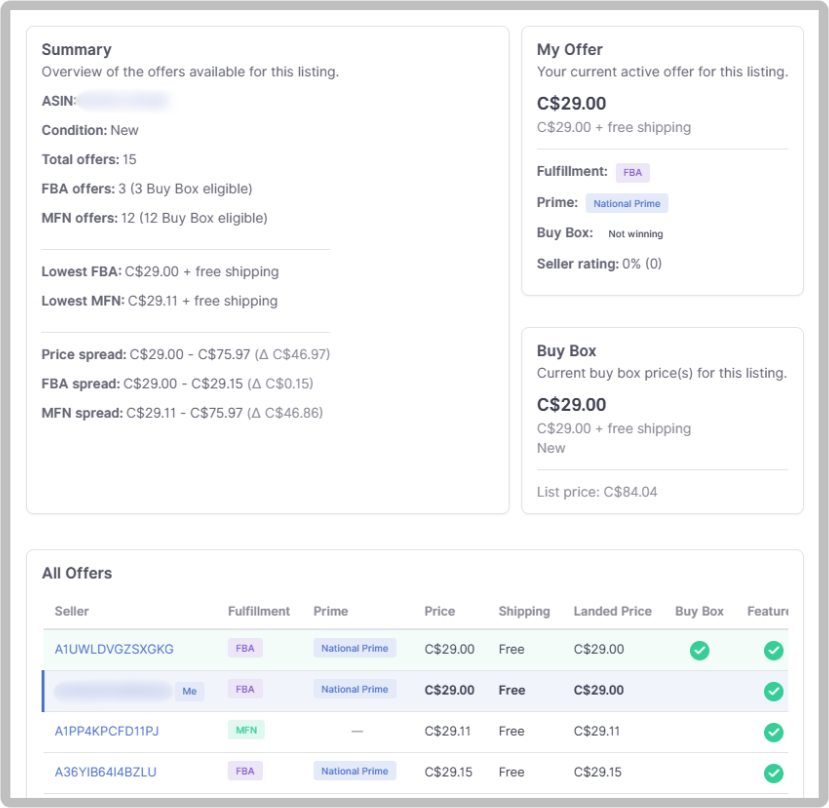
We've added a new Competitive Landscape view to see every seller competing on the same listing. Their prices, fulfillment methods, Buy Box status, and more.

With this update, you're able to:

  • See all active offers on a listing in one place

  • Compare prices, fulfillment types, and seller ratings across competitors

  • Check who's winning the Buy Box and who's Featured Offer eligible

  • View price spreads to understand where you sit in the market

Access it from the Actions menu on any listing, or click the Buy Box or Competition values directly on the Listings page. For a more detailed breakdown of the Competitive Landscape feature, check out the Help Center article .

Read more
Smarter Buy Box Strategies

Smarter Buy Box Strategies

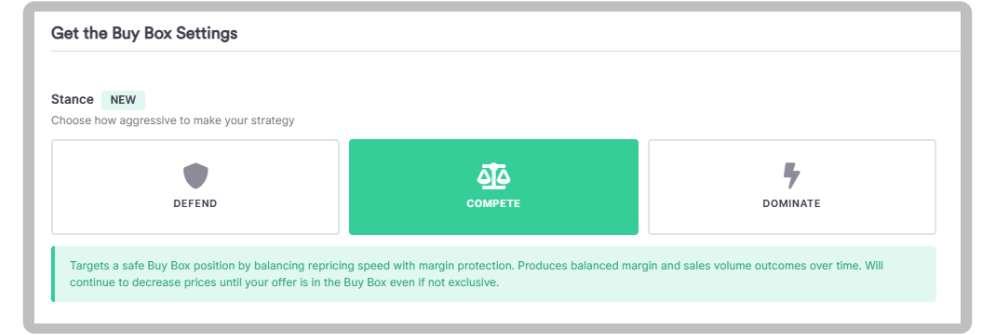
Get the Buy Box is a self-learning strategy that adapts its pricing decisions over time as it gathers data from each listing and its competitive landscape. Now, with the new Stance setting, you can guide how aggressively the strategy pursues the Buy Box, so it learns and competes in ways that fit your goals.

You can choose from three stances in the strategy editor:

  • **Defend: **Targets expected Buy Box prices without undercutting. Prioritizes margin protection and will not lower your price further if the Buy Box isn't won on the initial attempt. Best for a cautious, margin-focused approach.

  • **Compete: **The classic Get the Buy Box strategy that you know and love. Balances Buy Box pursuit with margin protection and continues adjusting until your offer is in the Buy Box, even if it's shared.

  • **Dominate: **Targets the exclusive Buy Box. Uses larger price adjustments and keeps going until you secure exclusive Buy Box ownership, even if you already share it. Best for pursuing Buy Box ownership as aggressively as possible.

Every stance will still work to raise the price whenever possible once your offer is in the Buy Box.

For a full breakdown these settings check out the Get the Buy Box article in our Help Center.

Read more
Target Exclusive Buy Boxes

Target Exclusive Buy Boxes

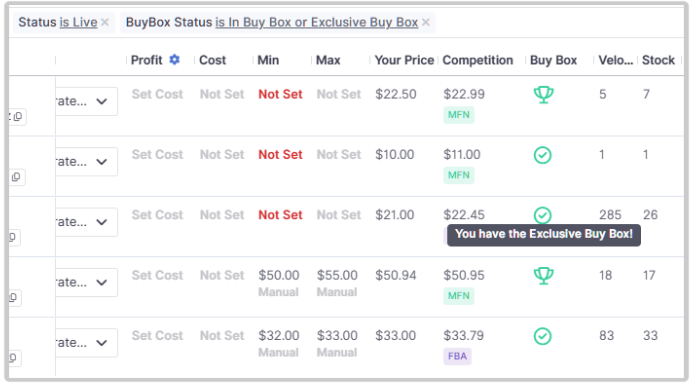
The listing page has a new value in the Buy Box column to indicate whether you own the Buy Box exclusively or share it. The new value is also available in the Buy Box status filter making it available for filtering, saved views, and strategy automation.

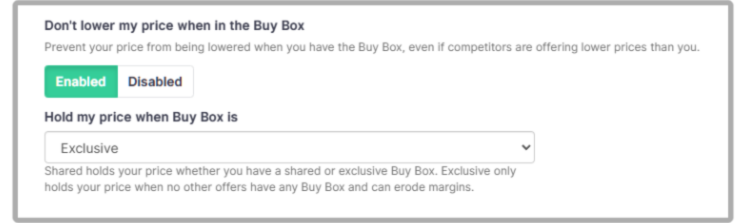
In addition, a new "Exclusive" option to the "Don't Lower My Price When I Have The Buy Box" setting gives shared vs. exclusive control if you'd like to fine-tune your custom strategies. The new setting provides access to the same behavior that the Dominate the Buy Box strategy type uses.

Read more
Additional Cost field

Additional Cost field

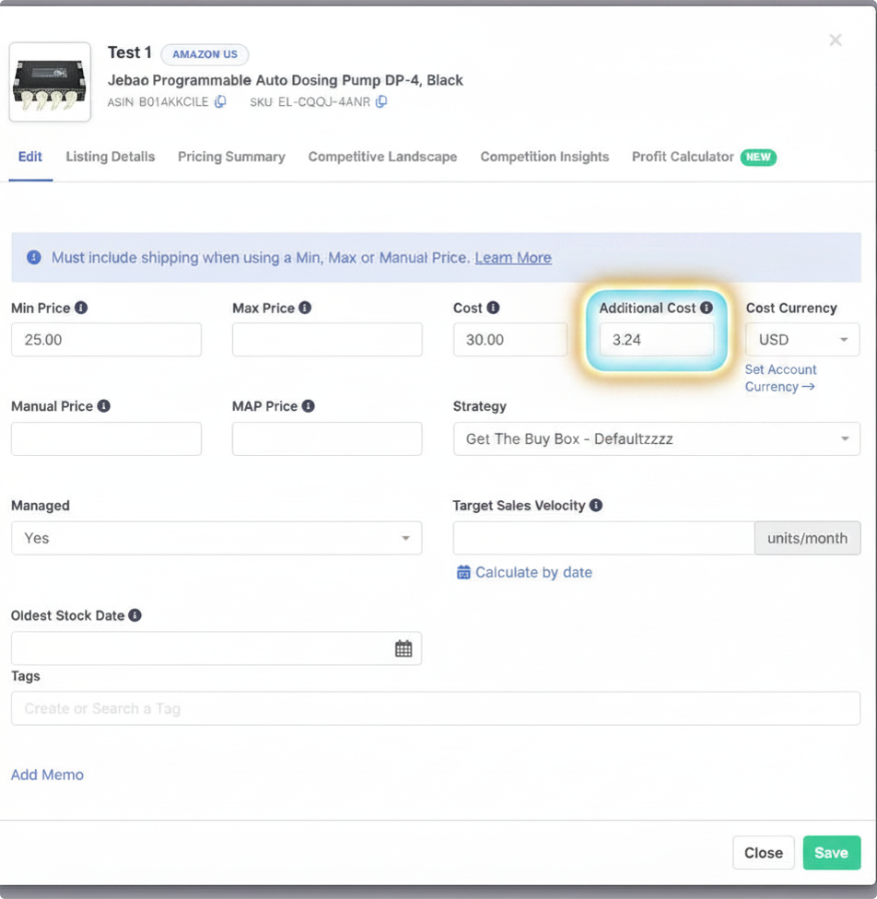
A new Additional Cost field is now available to give you more precise control over your pricing and profit calculations.

With this update, you're able to:

  • Track extra costs like shipping or labeling separately from the base product cost

  • Factor those costs into profit calculations and pricing decisions

  • Include additional cost in uploads, exports, and formula-based min/max settings

  • See the base and additional cost broken out on the Listings page

Read more

Utilize CPT in filters, automations and exports

Amazon’s Competitive Price Threshold is a key signal Amazon uses when determining Buy Box eligibility. Learn more about CPT.

With this update, you're able to:

  • See the CPT data in a new column on the Listings page and in the Listing Control Panel under the Competition Insights tab

  • Include CPT in data exports via the Listings page or the API

  • Sort and Filter listings by the CPT value

  • Include CPT in custom views for use in Strategy Automations

Read more
Amazon Ireland Support

Amazon Ireland Support

Amazon launched a new marketplace in Ireland in March of 2025 along with a local Prime membership for Irish residents for the first time.

You can now connect your Amazon Ireland account to Informed Repricer and start repricing on amazon.ie to reach an additional 5 million European customers.

Read more
Prioritize FBA Listings

Prioritize FBA Listings

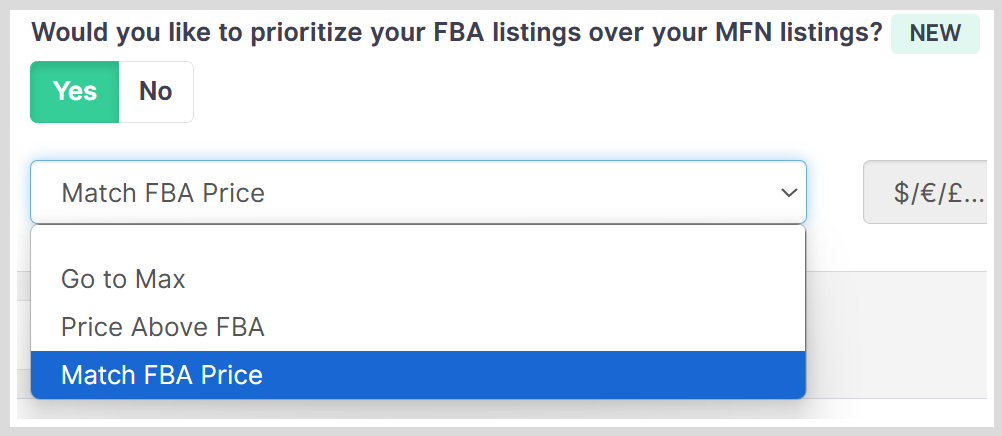
Prioritize FBA is designed specifically to help you selling through your FBA inventory before your MFN stock for the same product, helping you avoid Amazon storage fees and manage your inventory more effectively.

With the FBA Priority feature, you can:

  • Use your MFN listing's maximum price when your FBA listing is active.

  • Automatically price MFN listings above your active FBA listing by a set dollar ($) or percentage (%) amount.

  • Match your MFN price directly to your active FBA listing price so it doesn’t steal the Buy Box.

You can find this option under the Amazon settings of your strategy.

Read more
Set Negative Margins for Liquidation Items

Set Negative Margins for Liquidation Items

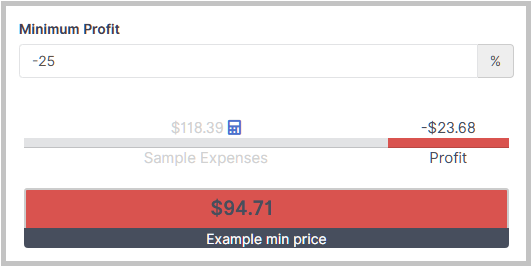
Need to move stale inventory? You can now set a negative profit margin for listings you want to liquidate. This gives you more control when pricing aggressively to clear out low-performing stock.

You can find this option under the Min/Max Price settings of your strategy.

Read more
Introducing Strategy Automation

Introducing Strategy Automation

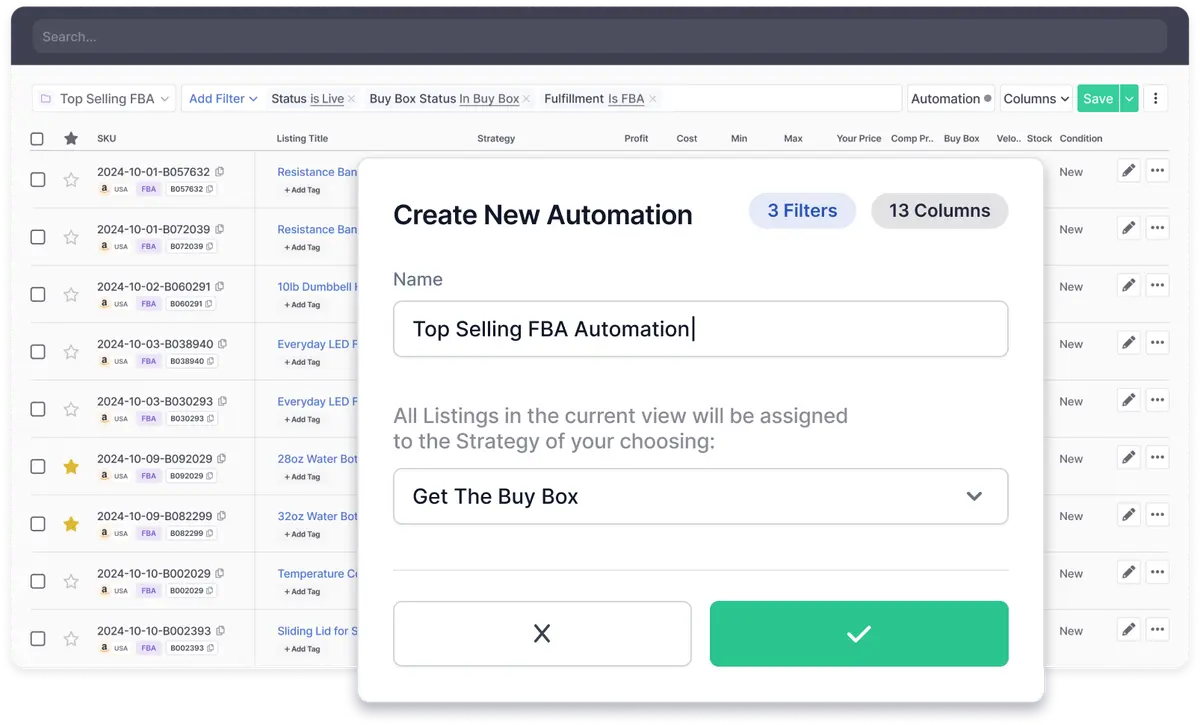
With Strategy Automation, you can set rules to adjust your pricing strategy in real time. To make this feature even more powerful, we’ve introduced two new filters:

  • Backordered Inventory: Automatically adjust pricing for backordered items to protect your margins.

  • Remaining Days of Inventory: Assign strategies based on how many days of inventory remain in stock.

Simply select your filters, save your custom view, and let Strategy Automation handle the rest.

What kind of Strategy Automation can I set up?

Here are some examples of automations you can create using Strategy Automation and the new filters:

  • Inventory-based: Use the Remaining Days of Inventory filter to adjust pricing as your stock levels change.

  • Buy Box listings: Move listings in the Buy Box and priced at their maximum to a strategy with a higher maximum price.

  • Low stock (or Backordered Inventory): Automatically switch to a strategy that raises prices to optimize margins for low or backordered stock.

Need help getting started? Check out our Help Center Article.

We’re excited to see how you use Strategy Automation and these new filters to optimize your repricing strategies. Stay tuned, we’re continuing to make this feature even more powerful!

Read more