
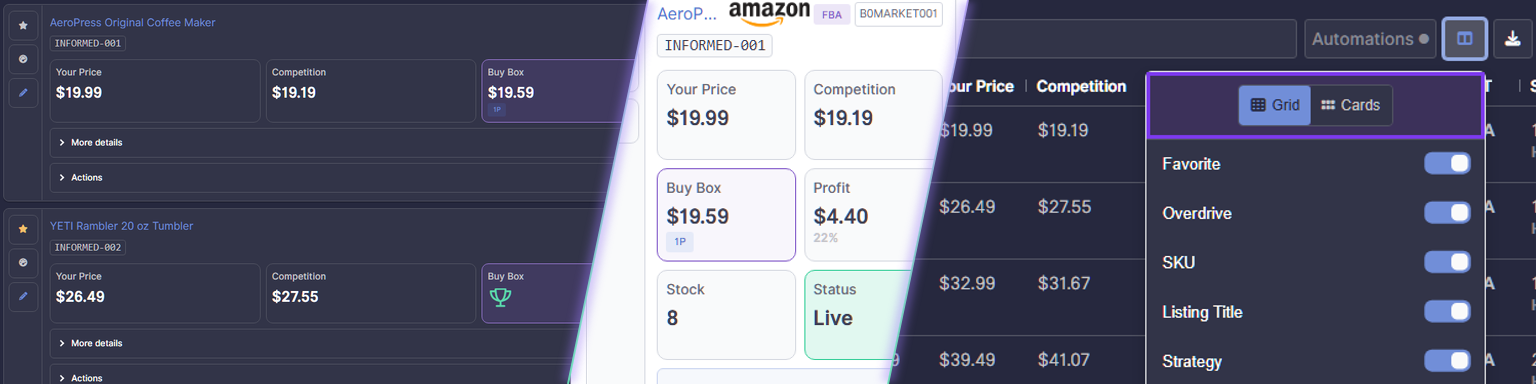
Your Listings page has a new Card view, making it easier to review and manage listings wherever you're working. The layout is designed for smaller screens and touch interactions, and you can choose it on desktop too.
Your listings, ready for mobile
Card view is the default on mobile, so you can see your listings in a layout that fits your screen without relying on a wide table. Each card brings key information together, including your price, competition, Buy Box, profit, stock, and listing status.
Tap More details or Actions on a card when you need to go further. The touch-compatible layout makes it easier to navigate your listings and reach the controls you need on your phone.
Choose Card view on desktop
Prefer the card layout on a larger screen? Open the grid layout menu on the Listings page and select Card view. You can switch back to the grid when you prefer a table-style view.
Whether you're checking a listing on the go or reviewing your catalog at your desk, choose the layout that works best for you.