
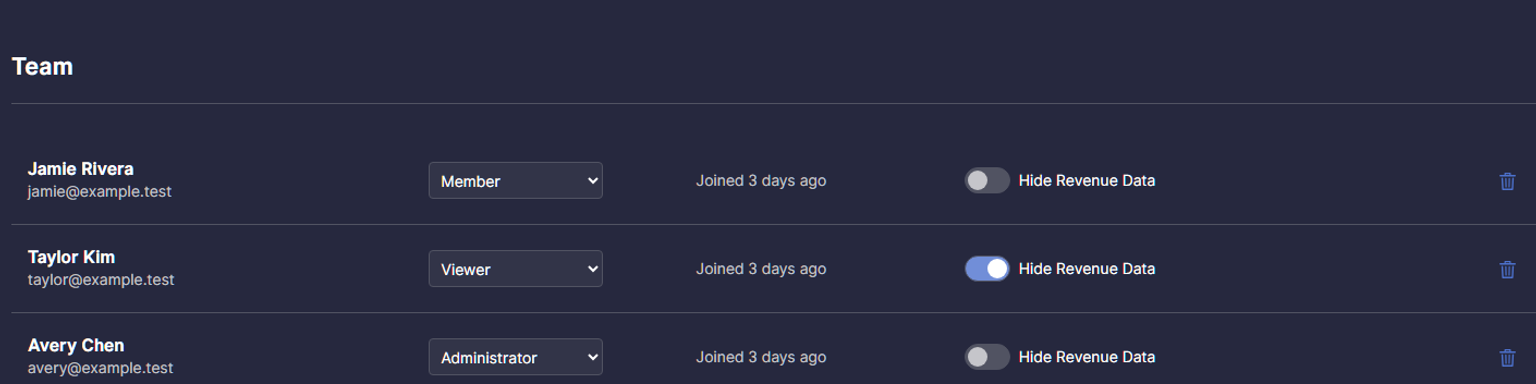
Your team members don't all need the same access to your account. New sub-user roles and a Hide Revenue Data control give you more flexibility to share the tools people need while keeping account management and sensitive information in the right hands.
Choose the right role for each team member
Assign a role to each sub-user based on how they work in Informed Repricer:
- Administrator: Helps manage the account and can add or remove team members.
- Member: Can work in the account and make changes.
- Viewer: Can review information without making changes.
These roles make it easier to give someone access for day-to-day work, involve a teammate who only needs to review information, or delegate team management to an administrator.
Control revenue and profit visibility
Turn on Hide Revenue Data for an individual sub-user to prevent them from seeing revenue and profit data on the Dashboard and Analytics pages. This gives you another way to tailor access for team members who need to work in the account but don't need those figures.
The control applies per user, so you can make that choice separately for each member of your team.
Manage your team
Account owners and administrators can manage team members from the Team section of Account Settings. Choose a role for each sub-user and use the Hide Revenue Data switch where appropriate. You can update these settings as responsibilities change.