
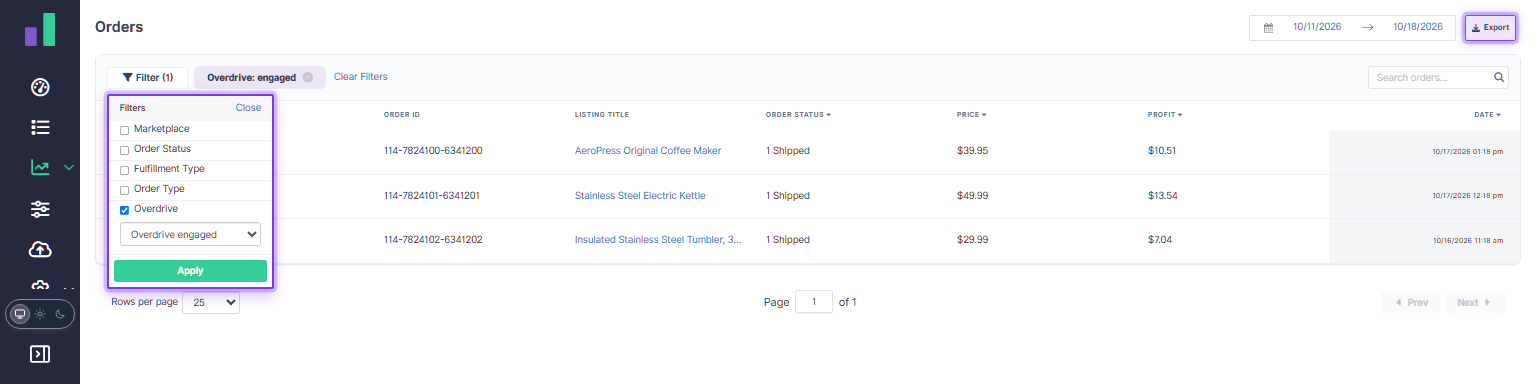
It's easier to explore your sales and take your order data further. The Orders page has more flexible pagination and a new export, while updated Analytics filters help you focus on the data that matters to you.
Find the orders you need
Choose how many orders to display per page, from 25 up to 1,000, and use the filters to narrow your results. Orders can also show whether Overdrive was selected for the listing when the order was processed, and you can filter by that status. For older orders where this information wasn't recorded, the status remains unknown.
Focus your Analytics
The updated Analytics filters let you refine your view, including by order status and Overdrive selection. Use them to explore sales and profitability for the orders you're interested in.
Export orders and use them in your workflows
Select Export on the Orders page to download a CSV of all orders matching your current filters and selected date range, not just the rows on the current page. The date range defaults to the past seven days and can be changed before exporting. The export includes order and listing details, sales and profit information, and the recorded Overdrive status where available.
You can also request an Orders report through the Reporting API or the Informed Repricer MCP, making the export available to your integrations and AI agents. Specify a start and end date for the report; if you omit both, it defaults to the preceding 30 days. Learn more in the API documentation or explore the Informed Repricer MCP.